Life in Pixels

haud ignota loquor

  • Status Update: Back in CPT

    Six weeks flies faster than a new Boeing 747-8. In fact, thinking about it, I’ve been on “holiday” for longer than the regular six-week mid year vacation, since I actually finished “exams” earlier than most.

    So anyway, I write this blog post from Cape Town after vacationing at home in Durban for the past six weeks. However, if you look to the right sidebar, you’ll see the countdown timer set for my next voyage home (for private reasons). This semester will be full of traveling for me, and whilst I love traveling, I know it’s going to be both exhausting and challenging. I say bring it on.

    I’m excited for the new term, and I’ve got a few personal projects lined-up to keep me busy in my downtime. Having finished with most software development/design work for SKKSA over the past six weeks (yes, I work even when on holiday…), I now have some time to focus on my personal goals. Exciting stuff.

    Keep an eye on the blog for more posts, and be sure to subscribe via email (from the right sidebar) or RSS (link at the top of the blog).

    All for now.


  • Timeless Design #1: Parker Jotter

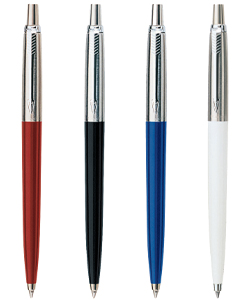
    The very first pen I ever used (once I had gotten my “pen license” back in Grade 4) was a Parker Jotter. Since then, the phrase “ballpoint pen” has come to be synonymous, for me, with Parker’s iconic design.

    But what makes this pen so iconic?

    It lies in the simplicity of the design. The Jotter is a clean, professional, straightforward writing instrument. The “feathered arrow” clip has come to signify this design, as has the tapered, almost bullet-like barrel. Since its introduction in the 1950s, the Jotter’s design hasn’t changed much. The technology within the pen is in itself remarkable, and shows the level of attention to detail, and the care and craftsmanship behind the design. For example, each click rotates the ink cartridge 90˚, ensuring even wear on the delicate plastics of the refill.

    But for the average user, such things are inconsequential, and the pen’s design speaks for itself: its smooth surfaces, chromed clip holder and matte or shiny barrel present an inviting instrument beckoning one to jot down thoughts.

    And it’s light. This, alone, is a major factor in the success of the pen: it truly lives up to its name, allowing rapid movement across the page.

    The Jotter’s colour scheme is another major design point. Throughout its long history, this pen has featured a range of bright colours appealing to students, and more subdued, “serious” tones perfect for diligent scriveners or boardroom warriors.

    I’ve gone through numerous Jotters since I began writing in ink. And whilst I continue to live a life in pixels, the Jotter will always remain my faithful companion, ready to ink my thoughts and ideas.


  • Introducing the Timeless Design Series

    Every so often, we are graced with products that are so beautifully designed, they manage to stand that most arduous of tests: the test of time. As  a person who values the power of good design, and appreciates the efforts taken by the engineers and designers who have put together these products, I’ve decided to create a post series highlighting a selection of products that I personally love, and think have the mettle to be lasting icons.

    Over the next few months, I’ll be writing about these products, from both the analogue and digital world, that have transformed the way we live our lives through their brilliant design.

    I personally believe that good design is something that can easily be achieved, no matter the budget, if those involved take the time to think, and carefully consider the way the elements are put together to create a project. Time, and not money, is the key essence to producing work that can really contribute to bettering the way our world is shaped.

    Look out for the Timeless Design Series on Pixelated Thinking. You can subscribe to the blog via RSS or email (form is on the sidebar).


  • SKKSA ID: Building a Software System

    About four years ago, I had the idea of creating a student database program for my dad’s karate organization, SKKSA. Since then, my technical experience in programming has evolved, and so has the karate oraganization’s reputation – as one of South Africa’s leading karate organizations. SKKSA has become known for a unique, innovative flair that’s unparalleled.

    This year, after much research and testing, I was able to finally sit down and write a completely new system for the organization, initially codenamed “Project Nexus”, and now officially renamed SKKSA ID. In this post, I’ll attempt to explain some of the processes, and philosophy that drives this new system.

    (more…)


  • Automator: The Unsung Hero of the Mac

    There is an app that comes standard with Mac OS X – in fact, it’s been there for many of the operating system’s iterations – that is, for me, an unsung hero of the power of the Macintosh.

    It’s called Automator. According to Apple,

    Automator is your personal automation assistant, making it easy for you to do more, and with less hassle. With Automator, you use a simple drag-and-drop process to create and run “automation recipes” that perform simple or complex tasks for you, when and where you need them. (source: apple’s mac 101)

    Mac users can access Automator by typing “Automator” into the Spotlight search (top right in the menu bar).

    Why I love Automator

    As webmaster for SKKSA, I need to prepare hundreds of photos to go online in a single update of our website’s gallery. When a photo is taken by our photographers, the hi-res file size is over a megabyte, making it unwieldy for use on our website (we try to optimize it for as many users with varying Internet connections and technologies). Furthermore, I need photos to have meaningful file names so that I can easily manage them once they’re on our server.

    Enter Automator: I design workflows in Automator to take a bunch of photos I’ve dropped into it, and re-size them by a certain percentage factor. Then I arrange for Automator to rename the files sequentially, appending a number to the prefix, and then the named description (usually the name of the event). Clicking “Run workflow” sends this wonderful robot into action, and it diligently executes the workflow I designed.

    This process saves me at least two hours’ work.

    But Automator goes beyond simple file tasks. You can use it to design PowerPoint and Keynote presentations, rotate images, even execute system tasks such as operating the iSight camera within an app like iPhoto.

    Automator is just another reason why I’m in love with the Macintosh, and why I can’t imagine life without my beloved MacBook Pro.